 AI-First Culture
Summary
As SMBs outgrow legacy systems, ERP decisions are shifting from functionality to intelligence. This blog explores how AI agents in D365 Business Central move beyond a system of record to enable smarter automation, faster insights, and improved productivity.
Most SMBs have outgrown their legacy system and are evaluating their ERP system to keep up with growing operational complexity. Disjointed processes, manual work, and delayed insights often signal it’s time for a more modern platform.
At this stage, Dynamics 365 Business Central often comes into consideration as a modern ERP alternative. It promises better integration, cleaner data, and improved control across finance and operations.
But ERP decisions in 2026 are no longer driven by functionality alone. The ability to leverage AI within core processes is becoming a key differentiator.
With 79% of organizations already adopting AI agents and 66% reporting productivity gains (PwC, 2025), the question for SMBs is no longer whether to modernize. It’s whether their next ERP can act as a system of intelligence, not just a system of record.
This is where AI agents in Business Central become a key consideration. They shift ERP from a passive system of record to an active participant in managing and executing business processes. Let's see how!
How AI Agents Operate in Business Central
AI agents in Dynamics 365 Business Central are designed to work within defined business processes, helping automate and support specific tasks while keeping users in control.
1. Signal-Based Triggers
AI agents respond to signals such as emails, transactions, data updates, and system events to identify tasks that may require action.
2. Context-Aware Processing
Agents combine business data, records, and predefined rules to understand the context before suggesting or executing actions.
3. Task Execution with User Control
AI agents can assist in activities like drafting records, matching data, generating summaries, or routing approvals, typically operating within user-defined workflows.
4. Guardrails and Configurable Rules
AI Agents function within set boundaries such as approval thresholds, compliance rules, and process configurations defined by the business.
5. Human-in-the-Loop Handling
When required, agents pause and involve users for validation or approval, especially in cases that need judgment or exceed confidence levels.
What AI Agents Look Like Inside Business Central
AI agents in Business Central are not abstract concepts; they are purpose-built extensions that operate within specific business workflows. They are designed to reduce manual effort by handling repetitive, rule-driven processes while keeping users in control.
Here are some practical ways AI agents are being used inside D365 Business Central:
Sales Order Agents (Reducing Email-Driven Delays)
Sales order processing often starts outside the system, typically in emails, where customer requests need to be manually interpreted and entered.
An AI Sales Order Agent helps streamline this flow by:
- Reading incoming emails and extracting order details
- Identifying line items, quantities, and product references
- Validating data against live inventory in D365 Business Central
- Flagging shortages or inconsistencies
- Drafting quotes or sales orders for review
Instead of relying on back-and-forth communication, the agent ensures orders are structured, validated, and ready for approval with minimal manual intervention.
Payables Agents (Automating Invoice Processing)
Accounts payable workflows often involve repetitive data entry, document matching, and validation across systems.
A Payables Agent supports this process by:
- Capturing invoice data from emails or uploaded documents
- Matching invoices against purchase orders and receipts
- Validating amounts, taxes, and approval thresholds
- Identifying discrepancies early
- Preparing entries for review and approval
This reduces manual reconciliation effort and helps finance teams move faster with fewer errors.
Approval Agents (Streamlining Decision Workflows)
Approval processes are typically fragmented across emails, chats, and manual follow-ups.
An Approval Agent helps by:
- Detecting transactions that require approvals based on predefined rules
- Validating them against business policies
- Routing them to the appropriate stakeholders
- Gathering required documents or context
- Tracking and prompting pending approvals
- Logging decisions back into D365 Business Central
This ensures approvals move through a structured, consistent, and traceable flow.
Notification Agents (Proactive Alerts and Updates)
Critical updates often get lost in inboxes or require users to manually monitor dashboards.
Notification Agents help by:
- Monitoring triggers such as low stock, overdue invoices, or delayed processes
- Sending real-time alerts within Teams or D365 Business Central
- Providing contextual information along with alerts
- Suggesting next actions based on the situation
- Reducing dependency on manual tracking
This keeps stakeholders informed without requiring constant system checks.
Reporting Agents (Faster Access to Insights)
Reporting in traditional ERP environments often involves manual effort and delays.
Reporting Agents support this by:
- Generating scheduled or on-demand reports,
- Pulling data across finance, sales, inventory, and operations
- Delivering role-based insights to relevant users
- Highlighting anomalies or trends
- Enabling drill-down into underlying data
This allows teams to focus on analysis and decisions rather than data preparation.
Custom Agents via Agent Designer
Beyond built-in agents, Business Central now includes an agent design experience that lets admins, makers, and analysts prototype and refine custom AI agents tailored to specific business scenarios. This low-risk environment extends the same agent runtime used by built-in agents.
Why This Matters for SMBs
Instead of treating AI as an optional overlay, Business Central embeds AI agents at the heart of operations. That means:
- More automation of routine work
- Improved team productivity
- Better use of ERP data for actionable outcomes
All of these position AI agents as a meaningful product differentiator, especially for SMBs evaluating ERP options in 2026.
SMBs evaluating ERP must also consider the cost of Dynamics 365 Business Central alongside AI capabilities.
What ERP Without AI Agents Typically Looks Like vs With AI Agents
| Area | ERP Without AI Agents | ERP with AI Agents (D365 Business Central) |
|---|---|---|
| Task Handling | Tasks are manually initiated and executed by users | Tasks can be triggered, assisted, and partially automated within defined workflows |
| Data Processing | Requires manual entry, validation, and reconciliation | Assists in extracting, matching, and validating data with minimal manual effort |
| Workflow Execution | Relies on predefined workflows with human involvement at each step | Supports guided, context-aware workflows with reduced manual intervention |
| Decision Support | Users interpret reports and make decisions independently | AI agents provide contextual insights and suggestions within workflows |
| Exception Handling | Issues are identified manually through monitoring or reports | AI Agents detect anomalies and flag exceptions based on signals and rules |
| Reporting | Reports are generated manually or on schedules | AI Agents assist in generating and distributing insights automatically |
| Adaptability | Limited to configuration and static rules | AI Agents respond dynamically to data, context, and defined business inputs |
AI Agents in Business Central: Driving Measurable Business Value for SMBs
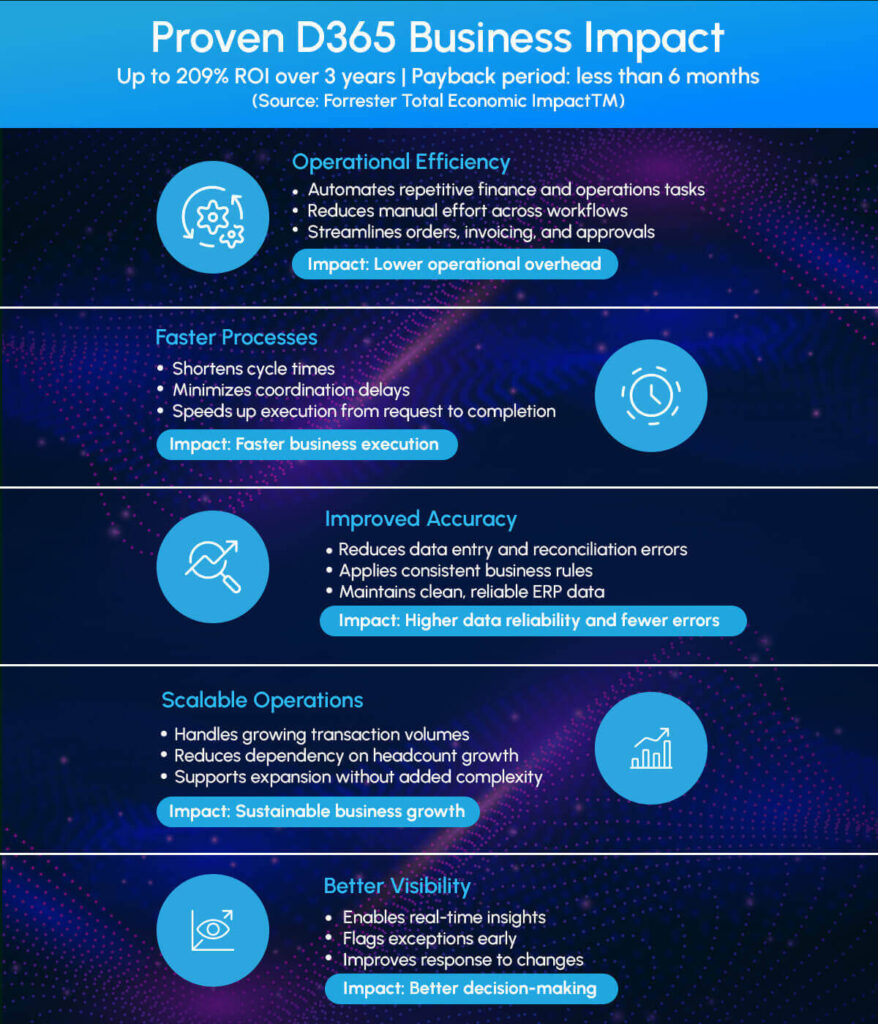
Agents have brought AI automation into D365 Business Central, transforming it from a system of record into a system that actively supports execution, insights, and growth.
Final Thoughts
AI agents are redefining how work gets done inside D365 Business Central. Instead of relying on manual coordination across emails, spreadsheets, and approvals, businesses can now embed intelligence directly into their core processes.
For SMBs, this shift goes beyond automation. It enables teams to operate with greater speed, accuracy, and visibility, while allowing the ERP system to actively support decisions and execution rather than just record them.
As AI agents become more deeply integrated into D365 Business Central, they are quickly evolving from a capability into a core differentiator for modern, scalable operations.
Want to see how AI agents can fit into your D365 Business Central environment? Start a conversation!
Download Whitepaper: How AI fits into your ERP journey, explore our detailed implementation approach
FAQs
No, AI agents typically enhance and extend existing workflows rather than replace them. They automate repetitive steps, while still allowing teams to retain control over approvals, exceptions, and final decisions.
Yes. AI agents can work across finance, sales, purchasing, and operations by using connected data within D365 Business Central, helping processes flow more seamlessly across departments.
Full Control. Businesses can define rules, thresholds, and approval conditions. AI agents operate within these guardrails and can escalate to human users when decisions require oversight or when confidence is low.
AI agents are most effective for repeatable, rule-driven, and data-heavy processes such as invoicing, order processing, approvals, and reporting. Highly strategic or ambiguous decisions still require human judgment.
Key considerations include process standardization, data quality, and identifying workflows with high manual effort. Businesses should start with high-impact, repetitive processes to see measurable value early.
Keep reading
Microsoft 365 Copilot: Features, Pricing, Licensing & ROI , The Definitive 2026 Guide

Business Central Support vs. In-House Teams: Which One Actually Scales Your Business?
Top 7 Reasons D365 Business Central is the Preferred ERP for Scaling North American Businesses
Ready to build smarter? Let's talk.
Our experts are ready to help you turn ideas into production-ready AI, cloud and digital solutions.
Get in touch →Let's Discuss Your Growth Strategy
Let's discuss how we can help you accelerate growth, improve efficiency, and drive real business outcomes.