 AI-First Culture
Microsoft 365 Copilot: Features, Pricing, Licensing & ROI , The Definitive 2026 Guide
Explore Microsoft 365 Copilot pricing, features, licensing, and ROI. A complete guide for businesses evaluating Copilot in 2026.
Quick Summary: Microsoft 365 Copilot is an AI layer embedded across Office apps that reduces manual effort, enhances productivity, and drives measurable ROI. This guide covers everything leaders need to evaluate Copilot effectively before investing.
Why Every Business Leader Is Talking About Microsoft 365 Copilot Right Now
AI hype is everywhere-but very little of it translates into measurable business impact. Microsoft 365 Copilot is starting to change that.
Early data points to real gains in productivity, efficiency, and output quality. A government pilot found users saving nearly an hour per day on summarization and drafting, with 61% reporting measurable improvements in work quality. At a broader level, Forrester's Total Economic Impact study estimates a potential NPV of $19.7 million and an ROI of 116% over three years. For SMBs, projected ROI ranges from 132% to 353%.
That shifts the conversation from curiosity to decision. The real question for business leaders is no longer what Copilot is-but whether it's worth the investment, how licensing works, and if it can scale with your organization.
This guide answers those questions with clarity. It covers Copilot's features, pricing, licensing models, and real ROI benchmarks-along with the latest 2026 updates, including Wave 1 capabilities.
Insight: This guide is written for CFOs, IT leaders, operations managers, and ERP decision-makers evaluating Microsoft 365 Copilot for mid-market to enterprise deployment. We cover everything from Copilot’s AI architecture to its integration with Dynamics 365.
What Is Microsoft 365 Copilot? (And What It Actually Does at Work)
Microsoft 365 Copilot is an AI productivity assistant embedded directly into the Microsoft 365 app suite-Word, Excel, PowerPoint, Outlook, Teams, OneNote, and more. Unlike standalone AI chatbots, Copilot is grounded in your organization's actual data through the Microsoft Graph, which means it understands your emails, documents, meeting histories, calendar, chats, and project files.
The practical result: When you ask Copilot to draft a proposal, it doesn't produce a generic template. It pulls context from your recent emails with that client, your company's previous proposals stored in SharePoint, and the meeting notes from your last Teams call-and writes something that's actually relevant to your situation.
The Architecture Behind Copilot
Three layers work together to make Copilot function at the enterprise level:
- Large Language Models (LLMs): Copilot is powered by advanced AI models through Azure OpenAI Service, including GPT-series models. As of early 2026, Microsoft has added model choice inside Agent Mode in Excel, letting users select between Anthropic and OpenAI reasoning models.
- Microsoft Graph: This is the intelligence backbone. It indexes and connects all your Microsoft 365 content-emails, Teams chats, files, calendar events, contacts-and feeds that context to the AI at query time.
- Work IQ: Introduced in late 2025, Work IQ is the personalization layer that learns your communication style, typical workflows, role context, and relationships over time-making Copilot responses increasingly tailored to you.
Security & Privacy: Copilot only accesses data you already have permission to view. It inherits your existing Microsoft 365 permissions, sensitivity labels, and data loss prevention policies. Your prompts and responses are never used to train Microsoft’s underlying AI models.
Microsoft 365 Copilot Features: A Full Breakdown by Application
One of the common misconceptions is that Copilot is just a chatbot bolted onto Microsoft 365. In practice, it's deeply integrated into every major application-and in 2025 and early 2026, Microsoft has rolled out Wave 1 agentic capabilities that push Copilot well beyond simple prompt-and-response interactions.
1. Copilot in Microsoft Word
Copilot's Word integration has evolved from a drafting assistant into what Microsoft now calls an 'agentic' experience. Here's what it can actually do:
- Agentic drafting: Give Copilot a simple prompt like 'Write a project status report for our Q1 ERP rollout' and it asks clarifying questions about tone, structure, and audience-then generates a full, formatted document by pulling context from your emails, Teams chats, and SharePoint files.
- Document summarization: Paste in a 40-page contract, ask for the key obligations, and Copilot produces a structured summary. Law firm DWF reportedly cut a seven-day contract review process down to seven hours using this capability.
- Rewrite and restructure: Ask Copilot to shorten a section, adjust tone, or restructure the document flow. It edits in place with tracked changes you can review.
- Cross-file referencing: Copilot pulls information from related files across OneDrive and SharePoint while you're writing, automatically updating reports when source documents change.
- Formatting and style compliance: Apply your organization's document templates and style guidelines automatically across long documents.
2. Copilot in Microsoft Excel
Excel is where many finance teams will see the fastest tangible ROI. Copilot's Excel capabilities are extensive:
- Natural language data analysis: Ask 'What are the top-performing regions by revenue over the last six months?' and Copilot generates charts, pivot tables, and trend analysis automatically.
- Agent Mode (now generally available): Copilot executes multi-step analytical tasks-building models, reshaping tables, generating multiple charts, and creating new worksheets-as a sequential, reasoned workflow. Users can watch Copilot's reasoning steps and course-correct at any point.
- Formula assistance: Explain a complex formula in plain language, ask Copilot to write it, or have it explain an inherited spreadsheet's logic.
- Data cleaning: Identify inconsistencies, flag duplicate entries, and standardize data formats across large datasets.
- Model choice: In Agent Mode, finance teams can select between OpenAI and Anthropic reasoning models depending on task requirements.
3. Copilot in Microsoft PowerPoint
Creating presentations typically consumes a disproportionate amount of senior staff time. Copilot dramatically compresses this:
- Full presentation generation: Give Copilot an outline or a Word document and it generates a complete, branded slide deck using your organization's approved templates, colors, layouts, and image library.
- Clarifying question mode: For new presentations, Copilot asks about the intended audience, level of detail, and desired structure before building anything.
- Slide explanation: Select any slide, text box, table, or acronym and get an instant contextual explanation-useful for reviewing inherited decks or complex technical content.
- Organization image library: Copilot integrates with company-approved image sources so presentations use on-brand visuals automatically.
- Speaker notes and summaries: Auto-generate speaker notes for each slide or create an executive summary of an existing presentation.
4. Copilot in Microsoft Outlook
Email overload is one of the most common productivity complaints from knowledge workers. Copilot's Outlook capabilities target this directly:
- Thread summarization: Get a concise summary of a long email thread, catching up on conversations that span dozens of messages without reading each one.
- Inbox triage: Copilot surfaces urgent emails, flags items requiring action, and suggests one-tap prompts to help you work through your inbox systematically.
- Intelligent email drafting: Draft replies grounded in the full context of the thread and your organizational data-producing professional, accurate responses rather than generic text.
- Meeting scheduling from email: Copilot analyzes email threads, identifies the need for a meeting, suggests available times, drafts an agenda, and sends invites-all from a single prompt.
- Voice-activated email (iOS and Android): Manage your inbox hands-free by speaking commands to Copilot on mobile.
5. Copilot in Microsoft Teams
For distributed organizations or companies with significant meeting loads, Teams Copilot is often where the most immediate time savings appear:
- Real-time meeting assistance: Copilot joins meetings, provides live summaries, identifies open questions, tracks who committed to what, and surfaces relevant documents from past discussions.
- Meeting catch-up: Miss a meeting? Ask Copilot to summarize it-including decisions made, next steps assigned, and key discussion points. Forrester research found this accelerates meeting catch-up by a factor of four.
- Agenda drafting: When scheduling a meeting, Copilot drafts an agenda based on the meeting title, attendees, and recent relevant communications between those participants.
- Action item tracking: Copilot captures commitments made during meetings and turns them into tasks in Planner or follow-up emails in Outlook.
- Teams Mode: Group chats can now include Copilot as a participant, bringing AI assistance into collaborative conversations.
6. Copilot Chat and Copilot Pages
Copilot Chat is the conversational interface available across all Microsoft 365 surfaces-and it's now included at no additional cost for all Microsoft Entra ID users with an eligible Microsoft 365 subscription.
Copilot Chat lets you ask questions across all your work data, conduct research combining web data with internal documents, and generate content from scratch. Copilot Pages takes conversational outputs further-organizing AI-generated content into collaborative, shareable pages that teams can build on together, track changes to, and use for project documentation.
Copilot Agents: The Biggest Shift in 2026
The most significant development in Microsoft 365 Copilot over the past year isn't any single feature-it's the emergence of AI agents. AI Agents are designed to plan, reason, and make decisions autonomously, executing multi-step tasks across systems without requiring constant human input.
Here's what this means in practice:
- Pre-built agents from Microsoft and partners available through the Agent Store, covering workflows like SharePoint navigation, meeting management, and CRM lookups.
- Copilot Studio: IT teams and power users can build custom agents using natural language prompts or pro-code, tuned to your organization's specific processes and compliance requirements.
- Agent Builder: Non-technical users can create agents directly inside Microsoft 365 Copilot, with agents now able to generate Word, Excel, and PowerPoint files as outputs.
- Workflows agent: Automates repetitive cross-app tasks such as sending meeting summaries to a SharePoint list, creating Planner tasks from emails, or generating weekly digest reports.
- Researcher agent: Executes complex multi-step research using deep reasoning models, pulling from internal work data and web sources to produce source-cited research reports.
Strategic Insight: This shift is driving Microsoft’s vision of human-led, agent-operated organizations-where AI handles routine complexity while humans focus on judgment-heavy decisions. This is the “Frontier Firm” concept introduced at Ignite 2025.
Microsoft 365 Copilot Pricing: The Complete Breakdown
Copilot pricing has gotten more accessible since it launched-the structure is now split into two tiers that matter significantly for your licensing decision.
Tier 1: Copilot Chat - Included for Free
As of late 2025, Microsoft includes Copilot Chat at no additional cost for all Microsoft Entra ID users with an eligible Microsoft 365 subscription. This gives every licensed user access to:
- Secure AI chat grounded in web data
- File upload and basic document analysis
- Copilot Pages for collaborative content
- Standard access to Agent Mode in chat and Office apps (rolling out through early 2026)
- Enterprise-grade data protection and IT admin controls
This is not the full Copilot experience, but it's a meaningful entry point-and it removes the previous barrier where organizations had to commit to full Copilot licensing just to explore the technology.
Tier 2: Microsoft 365 Copilot -The Full License
| Plan | Price | Seat Limit | Prerequisites |
|---|---|---|---|
| Microsoft 365 Copilot Business | $21/user/month | Up to 300 users | Microsoft 365 Business Basic, Standard, or Premium |
| Microsoft 365 Copilot (Enterprise) | $30/user/month | Unlimited | Microsoft 365 E3, E5, or eligible enterprise plan |
| Promo Bundle: Business Standard + Copilot Business | $22/user/month (first year) | Up to 300 users | New Microsoft 365 commercial customers only |
| Promo Bundle: Business Premium + Copilot Business | $32/user/month (first year) | Up to 300 users | New Microsoft 365 commercial customers only |
A few things worth noting about this pricing structure:
- The Copilot license is an add-on-it does not replace your base Microsoft 365 subscription. You pay for both.
- The $18/user promotional pricing runs through June 2026 and requires a minimum of 10 bundle licenses.
- Enterprise customers at $30/user now also receive Copilot for Sales, Copilot for Service, and Copilot for Finance bundled at no additional cost.
- Microsoft 365 pricing is increasing on July 1, 2026 for some plans. Organizations in active renewal conversations can lock in current pricing by committing before that date.
ROI Example
For a 100-user organization on Microsoft 365 Business Standard ($12.50/user), adding Copilot Business at $18/user brings the total to $30.50 per user/month-or approximately $36,600 annually. The real question is whether this investment is justified by measurable ROI-which we explore in detail later in this guide.
Full Copilot License vs. Free Copilot Chat
| Capability | Copilot Chat (Free) | Full Copilot License |
|---|---|---|
| AI chat with web grounding | ✅ Yes | ✅ Yes |
| In-app Copilot in Word, Excel, PowerPoint | ❌ No | ✅ Yes |
| Copilot in Outlook (full) | ❌ No | ✅ Yes |
| Copilot in Teams (meeting intelligence) | ❌ No | ✅ Yes |
| Microsoft Graph grounding (work data) | Limited | ✅ Full |
| Copilot Search (semantic AI search) | Basic search only | ✅ AI-powered |
| Agent Mode in Office apps | Rolling out 2026 | ✅ Generally available |
| Copilot for Sales / Service / Finance | ❌ No | ✅ Bundled at no extra cost |
| Copilot Studio access | ❌ No | ✅ Included |
| Admin analytics and adoption reports | Limited | ✅ Full dashboard |
Not Sure Which Copilot Plan Fits Your Organization?
We’ll help you choose the right licensing model based on your users, business goals, and budget-so you invest with clarity.
Licensing Requirements: What You Need Before You Buy Copilot
Copilot is an add-on, which means it requires an eligible Microsoft 365 base subscription. This is where many organizations get caught off guard during procurement.
Qualifying Microsoft 365 Plans for Copilot
Business tier (Copilot Business, up to 300 seats):
- Microsoft 365 Business Basic ($6/user/month)
- Microsoft 365 Business Standard ($12.50/user/month)
- Microsoft 365 Business Premium ($22/user/month)
Enterprise tier (Copilot Enterprise, unlimited seats):
- Microsoft 365 E3
- Microsoft 365 E5
- Office 365 E3 and E5
- Certain legacy plans (contact your Microsoft representative)
Important Licensing Nuances
A few things trip up organizations during licensing that are worth calling out explicitly:
- Copilot in Excel requires AutoSave to be enabled-files must be saved to OneDrive. Locally stored, unsaved files don't work with Copilot.
- Copilot for Teams meeting intelligence requires a Teams license.
- Copilot for Sales, Service, and Finance (bundled with the $30 enterprise license) may have additional prerequisites for connecting to Dynamics 365 data.
- Power Platform licenses (Power Apps, Power Automate) are not included with Microsoft 365 Copilot-they require separate licensing.
- Government cloud tenants (GCC, GCCH, DoD) have restricted availability for some features including the Researcher and Analyst agents.
Key Update
If your organization is evaluating Copilot alongside a Dynamics 365 investment, note that Copilot capabilities for Dynamics 365 Sales, Service, and Business Central are now included at no extra cost as of October 2025-a significant shift that strengthens the overall ROI case.
Microsoft 365 Copilot ROI: What Does the Data Actually Show?
Measuring AI ROI is notoriously difficult because the benefits often show up as time reclaimed rather than direct cost reduction. The smartest way to approach Copilot ROI is across three dimensions: productivity gains, revenue impact, and cost avoidance.
The Forrester Research Findings
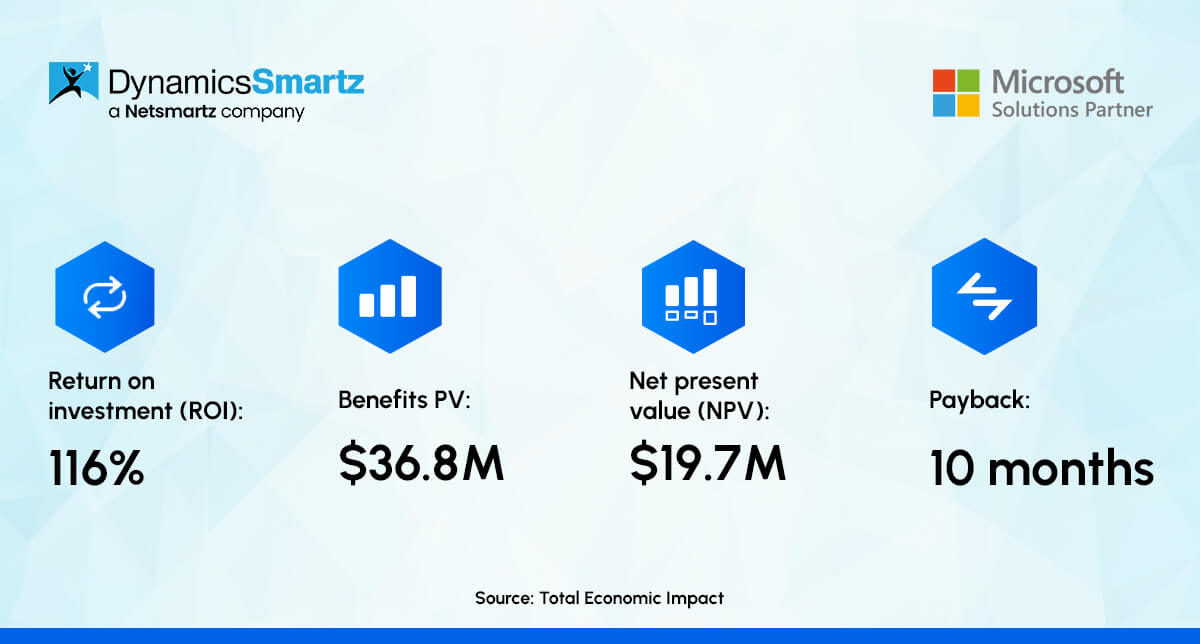
Forrester's Total Economic Impact study (March 2025), commissioned by Microsoft and based on interviews with 16 decision-makers from 12 organizations plus surveys of 367 respondents, built a composite model of a global enterprise deploying Copilot to knowledge workers. Key findings:
- Net Present Value: $19.7 million over three years
- ROI: 116% over three years
- Go-to-market impact: Revenue increased by as much as 4% through higher win rates, faster proposals, and improved customer retention
- Operational cost reduction: Total expenditures decreased by up to 0.7%, with projected savings of $27.6M to $56.7M over three years
- Onboarding improvement: New-hire onboarding time reduced by up to 30%
- Productivity per Copilot user: Each licensed user gained approximately 9 additional hours of productivity per month
For small and medium businesses, the projected ROI is even stronger: 132% to 353% over three years, according to Forrester's SMB-focused study based on surveys of over 200 companies. Read the full Forrester report.
1. Real-World Performance Examples
| Organization | Copilot Use Case | Measured Outcome |
|---|---|---|
| British Columbia Investment Corporation | Piloting across knowledge worker teams | 2,300+ hours saved; 10–20% productivity gains for 84% of users |
| Commercial Bank of Dubai | Automating routine communications | 39,000 hours saved annually |
| Law Firm DWF | Contract drafting and review | 7-day process reduced to 7 hours |
| Australia Government Pilot | Summarization and drafting | ~1 hour saved per day per user; 61% quality improvement |
| Microsoft TEI Composite Enterprise | Enterprise-wide Copilot rollout | NPV $19.7M; 116% ROI over 3 years |
2. How to Calculate Your Own Copilot ROI
- Assume a knowledge worker earns $75,000/year, or roughly $36/hour
- Copilot saves 30 minutes per day on drafting, summarization, and data analysis (conservative-research shows 1+ hour savings in many roles)
- That's 2.5 hours per week, 120+ hours per year-worth approximately $4,320 per employee annually
- Copilot costs $21–$30 per user per month, or $252–$360 per year
- The productivity gain alone represents a 12x to 17x return on the license cost, before any revenue impact
Data Insight
According to Forrester’s Total Economic Impact study 70% of enterprise Copilot users reported higher daily productivity across writing, summarization, and data analysis. Tasks like preparing presentations were completed 29% faster on average.
Source: Forrester TEI of Microsoft 365 Copilot, March 2025
3. Where ROI Is Strongest: Role-Specific Use Cases
- Finance teams: Copilot in Excel for multi-step financial modeling, variance analysis, and reporting.
- Sales teams: Proposal drafting, email personalization, meeting summaries, and CRM updates. Faster proposals mean compressed sales cycles.
- Legal and compliance: Contract summarization, clause extraction, and regulatory research.
- Operations and HR: Meeting intelligence, onboarding documentation, and policy communications.
- Customer service: Copilot for Service surfaces relevant knowledge base articles, drafts customer communications, and summarizes case histories.
Microsoft 365 Copilot vs. Competitors: A Quick Comparison
Most organizations evaluating Copilot are either already using Microsoft 365 or comparing it against Google Workspace with Gemini, or considering standalone AI tools like ChatGPT Enterprise. Here's how Copilot stacks up against the two most common alternatives.
1. Microsoft 365 Copilot vs. Google Workspace with Gemini
Google made a significant strategic move in 2025-2026 by bundling Gemini AI features into standard Google Workspace plans at no additional charge. This is the most important competitive development for Microsoft to contend with.
| Dimension | Microsoft 365 Copilot | Google Workspace + Gemini |
|---|---|---|
| AI Pricing Model | Paid add-on: $21–$30/user/month (Copilot Chat free) | Bundled into standard Workspace plans |
| App Integration | ✔ Deep integration across Microsoft apps | Integrated across Google Workspace apps |
| Enterprise Data Grounding | ✔ Microsoft Graph (rich enterprise context) | Google Workspace data |
| Meeting Intelligence | ✔ Real-time summaries, actions, catch-up | AI notes and summaries |
| Agent / Automation Platform | ✔ Copilot Studio (enterprise-ready) | AppSheet / extensions (less mature) |
| ERP / CRM Integration | ✔ Native Dynamics 365 integration | Requires third-party connectors |
| Security & Compliance | ✔ Purview, Defender, Entra stack | Strong but different framework |
| Offline Capability | Full desktop apps | Limited offline support |
| Best For | Enterprise, ERP-heavy, regulated industries | Startups, cloud-native teams |
For organizations already running Microsoft 365, the verdict is clear: Copilot is the natural and most impactful AI investment you can make. The Microsoft Graph integration, deep embedding across every Office app, and native Dynamics 365 connectivity give Copilot an advantage that no third-party AI tool can match within a Microsoft-first environment.
If you're a Google Workspace shop, switching to Microsoft primarily for Copilot doesn't make sense. Gemini is advancing rapidly and is now included in your existing subscription costs.
2. Microsoft 365 Copilot vs. ChatGPT Enterprise
ChatGPT Enterprise is powerful for general reasoning, code generation, and content creation-but it doesn't natively integrate with your organization's work data. It's a capable tool that requires manual input of context for every interaction. Copilot, by contrast, is always grounded in your emails, documents, meetings, and organizational relationships through the Microsoft Graph.
For knowledge workers who spend most of their day inside Microsoft 365 apps, Copilot's in-flow experience is considerably more efficient than switching to a separate ChatGPT interface for every AI-assisted task. For developers, data scientists, or creative teams who need raw AI capability outside of Office apps, ChatGPT Enterprise may still serve specific needs alongside Copilot.
Expert Perspective
Many enterprise organizations use both Copilot for in-flow productivity within Microsoft 365 and tools like ChatGPT Enterprise for specialized technical or creative work. These are not competing choices, but complementary solutions serving different use cases.
Enterprise Security, Privacy, and Compliance: What IT Leaders Need to Know
Beyond capability and cost, there is a third critical dimension every enterprise buyer must address before any AI deployment can scale: security, privacy, and compliance. Microsoft has built Copilot's security model on the same foundation as the rest of Microsoft 365.
1. Data Handling and Privacy
- Your organization's data is never used to train Microsoft's underlying AI models. Prompts, inputs, and responses remain within your tenant's security boundaries.
- Copilot only surfaces content that a user already has permission to access. If a document is restricted to the Finance team, it won't appear in Copilot responses for a user outside that group.
- Microsoft Purview provides unified audit logs for all Copilot and agent-related activities, supporting compliance reviews and security assessments.
- Sensitivity labels from Microsoft Purview Information Protection carry through to AI-generated content, preventing labeled content from being inadvertently shared through Copilot outputs.
2. Admin Controls
- The Copilot Control System in the Microsoft 365 admin center gives IT administrators comprehensive oversight of agent deployment, user access controls, and usage analytics.
- Admins can track prompt activity at the organizational and individual user level, monitor adoption, and benchmark usage against internal and external metrics.
- For regulated environments, web search grounding can be disabled, ensuring all Copilot responses are derived exclusively from internal organizational data.
- Agent inventory management allows AI admins to audit all deployed agents, including their knowledge sources, capabilities, and sensitivity levels.
Microsoft 365 Copilot and Dynamics 365: What ERP and CRM Users Need to Know
For organizations running Microsoft Dynamics 365-whether Business Central, Finance and Supply Chain, Sales, or Customer Service-the Copilot story is particularly relevant. Microsoft has made several moves in the past year that significantly strengthen the case for Copilot in ERP-heavy environments.
1. Microsoft Copilot Is Now Built into Dynamics 365 at No Extra Cost
Microsoft includes Copilot features for Dynamics 365 Sales, Dynamics 365 Customer Service, and Dynamics 365 Business Central within the standard Microsoft 365 Copilot subscription-no separate add-on required. The full Copilot license now covers:
- Copilot for Dynamics 365 Sales: AI-assisted lead scoring, opportunity summarization, email drafting grounded in CRM data, and call intelligence.
- Copilot for Dynamics 365 Customer Service: Case summarization, knowledge base search, email drafting, and suggested next steps in service workflows.
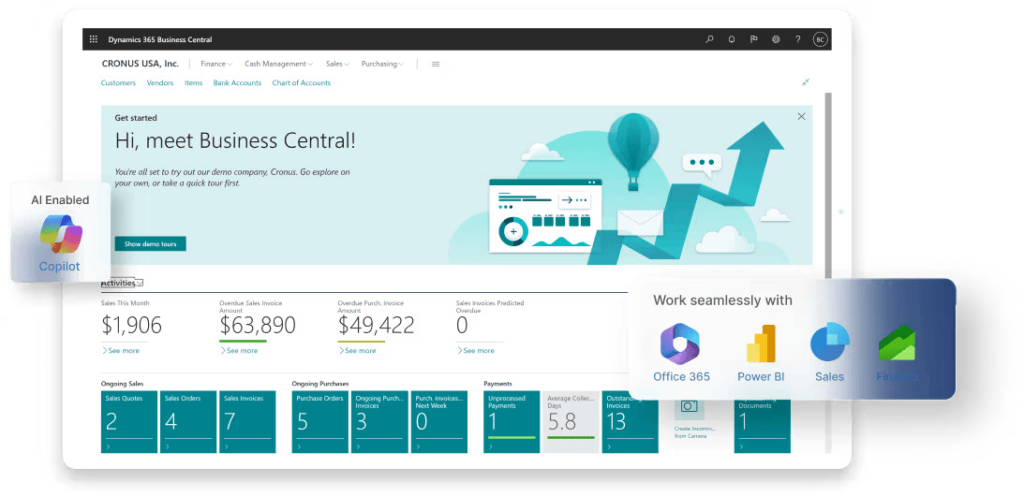
- Copilot for Dynamics 365 Business Central: Inventory and procurement AI insights, financial reconciliation assistance, and natural language querying of ERP data.
- Copilot for Finance: Financial process automation, variance analysis assistance, and cross-system reconciliation.
2. How Copilot Enhances ERP Operations
For operations leaders managing complex ERP workflows, Copilot's integration with Dynamics 365 creates opportunities to reduce the manual work that typically slows ERP adoption:
- Natural language ERP queries: Ask 'What's the current status of purchase orders over $50,000?' and get an answer drawn directly from Business Central data.
- Document generation from ERP data: Generate customer proposals, inventory status reports, or financial summaries directly from Dynamics 365 data, formatted in Word or PowerPoint automatically.
- Meeting intelligence connected to CRM: Copilot in Teams links meeting summaries to relevant CRM records, ensuring sales call notes flow into Dynamics 365 Sales without manual data entry.
- Cross-system search: Microsoft 365 Copilot Search surfaces data from connected Dynamics 365 systems alongside SharePoint files, emails, and Teams conversations in a single search interface.
Beyond the choice between Copilot and its competitors, there is a third dimension every enterprise buyer must evaluate before any AI deployment can move forward at scale: enterprise-grade security, compliance, and data governance.
Why DynamicsSmartz
DynamicsSmartz has been deploying Microsoft Dynamics 365 solutions since 1999. We help organizations configure Copilot within their Dynamics 365 environment-ensuring AI outputs are grounded in accurate, well-governed ERP data, which is critical for delivering reliable business insights.
Getting Copilot Right: Implementation and Adoption Best Practices
ROI from Copilot doesn't happen automatically at the point of licensing. It requires thoughtful deployment, change management, and adoption planning. Organizations that treat Copilot as a straightforward software rollout consistently underperform those that invest in structured adoption programs.
Phase 1: Data Foundation and Governance
Before Copilot can be effective, your Microsoft 365 environment needs to be properly organized. Copilot's quality is directly tied to the quality of your underlying data:
- Review SharePoint permissions and data governance to ensure content is properly classified and accessible to the right people-Copilot will surface whatever it has permission to access.
- Use SharePoint Advanced Management (SAM) to reduce oversharing, clean up inactive sites, and improve the signal-to-noise ratio of your content repositories.
- Apply Microsoft Purview sensitivity labels to confidential documents before enabling Copilot at scale.
Phase 2: Pilot with High-Value Roles
Start with 20 to 50 power users across departments where the use case is clear and ROI is measurable. Ideal pilot roles include:
- Finance analysts (Excel Agent Mode for financial modeling)
- Sales executives (Copilot for Sales and Teams meeting intelligence)
- Legal and contract management teams (Word summarization and drafting)
- HR and talent teams (document generation and onboarding materials)
- Senior leaders (Outlook triage, Teams catch-up, and executive briefing documents)
Phase 3: Measure and Expand
Microsoft's admin center now provides detailed usage analytics including prompt submissions, active user counts, feature engagement by app, and benchmark comparisons against industry peers. Use these to:
- Identify which teams are getting the most value and document their workflows as internal case studies.
- Spot adoption gaps where training or process guidance is needed.
- Build the business case for license expansion based on measured productivity gains.
Adoption Insight
Forrester’s research shows that ROI increases significantly when Copilot is deployed broadly-not just in Word and Outlook, but across Teams and integrated with ERP systems like Dynamics 365. Narrow deployment delivers incremental gains, while enterprise-wide adoption drives transformational outcomes.
Should Your Organization License Microsoft 365 Copilot? A Decision Framework
Rather than giving you a universal recommendation, here's a framework for making the right decision for your specific situation.
Strong Case for Full Copilot Licensing
- Your organization already uses Microsoft 365 as its primary productivity platform and Teams as its primary collaboration tool. The switching cost is zero, and the integration depth is immediate.
- You have knowledge workers who spend significant time in document-heavy workflows-legal, finance, sales, HR, consulting, or project management roles.
- You're running Dynamics 365 Sales, Business Central, Customer Service, or Finance. Bundled Copilot features significantly increase the effective value of the license.
- You're under competitive pressure to scale output without scaling headcount.
- You're in a regulated industry that needs AI tools with enterprise-grade security, compliance controls, and audit trails.
Consider Starting with Copilot Chat (Free) First
- Your organization hasn't yet standardized on Microsoft 365 or is in the process of cloud migration.
- Your team's work is primarily asynchronous, external-facing, or doesn't rely heavily on internal document repositories.
- Budget constraints require a phased approach. Start with Copilot Chat to demonstrate AI value, then build the business case for full licensing.
Five Questions to Ask Before Licensing
Before committing to organization-wide Copilot licensing, answer these five questions:
- What are the three highest-volume, most time-consuming tasks your knowledge workers do each week? Can Copilot materially assist with those specific workflows?
- How well-organized is your Microsoft 365 data environment? Copilot's quality directly depends on the governance of your underlying SharePoint, Teams, and OneDrive content.
- Do you have a change management plan? Copilot adoption without structured training and rollout consistently underperforms.
- Are you running Dynamics 365? If yes, the bundled CRM and ERP Copilot features substantially change the ROI math.
- What's your timeline for measuring ROI? Meaningful productivity gains typically emerge within 60–90 days of active use, but require 6–12 months to show up at the organizational level.
What's Coming: Microsoft 365 Copilot Wave 1 and Beyond
Microsoft announced Wave 1 of Copilot capabilities in early March 2026, and the roadmap reflects a clear direction: deeper agentic functionality, more reasoning power, and tighter integration across the Microsoft ecosystem.
Wave 1 Key Announcements
- Agent Mode is now generally available in Word and Excel for Microsoft 365 Copilot subscribers, with PowerPoint rolling out in preview. From March 2026, Agent Mode will also become available for users without a full Copilot license.
- GPT-5.4 Thinking and GPT-5.3 Instant are now available within Microsoft 365 Copilot and Copilot Studio-bringing the most capable OpenAI reasoning models into enterprise workflows with model choice built in.
- Work IQ now includes conversation memory-Copilot learns from previous interactions and recalls relevant context across sessions, making the experience increasingly personalized over time.
- AI-generated video creation via Sora 2 integration is available through the Frontier program, enabling marketing and communications teams to generate short-form video content from within Microsoft 365.
- Copilot response quality in Copilot Chat has improved significantly, with 3x more positive feedback (thumbs-up) over the past six months.
The trajectory is clear: Copilot is moving from a productivity assistant to an autonomous agent platform. Organizations that invest in building data governance, AI adoption culture, and Copilot Studio capabilities now will have a significant advantage as agentic AI becomes more capable and widespread.
How DynamicsSmartz Helps Organizations Maximize Microsoft 365 Copilot
DynamicsSmartz has been a trusted Microsoft Business Solutions provider since 1999. As a division of Netsmartz LLC, we've spent more than two decades helping mid-market and enterprise organizations implement, optimize, and scale Microsoft technologies-including Dynamics 365, the Power Platform, and now Microsoft 365 Copilot.
Our approach to Copilot is practical and grounded in real implementation experience. We don't just license the software and move on-we help organizations build the foundational data governance, integration architecture, and adoption programs that determine whether Copilot actually delivers ROI.
Our Copilot-Related Services
We help organizations deploy Microsoft 365 Copilot strategically-ensuring it delivers real business value across productivity, operations, and ERP workflows.
- Dynamics 365 Business Central + Copilot integration: We configure Copilot within Business Central and across Dynamics 365 applications-ensuring AI outputs are grounded in accurate, well-structured ERP data.
- Microsoft 365 Copilot readiness assessment: We evaluate your Microsoft 365 environment against governance, data quality, and configuration requirements for effective Copilot deployment.
- Copilot Studio agent development: We build custom AI agents tailored to your workflows, data sources, and business processes.
- Adoption and training programs: We design structured rollout plans, identify high-impact use cases, and enable your teams for long-term Copilot success.
- Power Platform integration: We extend Copilot capabilities using Power Apps, Power Automate, and Power BI to automate and optimize end-to-end business processes.
- Dynamics 365 + Copilot integration services: We integrate Copilot across Dynamics 365 Sales, Customer Service, Finance, and ERP systems to ensure seamless, data-driven AI assistance across your business.
Conclusion: Making the Right Decision for Your Organization
The real question is not whether Copilot works—but whether your organization is ready to extract its full value. The hype around AI has made it genuinely difficult to separate tools worth investing in from tools that are mostly marketing. Microsoft 365 Copilot sits firmly in the first category for organizations already embedded in the Microsoft ecosystem-not because Microsoft says so, but because independent research from Forrester and real deployment data from organizations across industries support it.
Here's what matters most:
- Copilot Chat is now free for all Microsoft 365 subscribers. There's no reason not to start there and build organizational familiarity with AI assistance.
- Full Copilot licensing costs $21/user/month for SMBs (promotional pricing through June 2026) and $30/user/month for enterprise-meaningfully lower than at launch.
- The bundled value has increased. Enterprise Copilot now includes Copilot for Sales, Service, and Finance at no additional cost-and Dynamics 365 Copilot features are included as well.
- The ROI case is strong. Forrester's latest data shows 116% ROI for enterprises and up to 353% for SMBs over three years, with 9+ hours of productivity per user per month as a measurable output.
- Agentic AI is the next chapter. Wave 1 and the ongoing development of Copilot Studio and autonomous agents represent a significant leap from productivity assistance to autonomous workflow execution.
- Data governance matters. The quality of your Copilot outputs depends directly on the organization and governance of your underlying Microsoft 365 data-the most commonly underestimated prerequisite.
Frequently Asked Questions (Microsoft 365)
What is Microsoft 365 Copilot? +
How much does Microsoft 365 Copilot cost? +
Is Microsoft 365 Copilot worth it for businesses? +
What are the licensing requirements for Copilot? +
Is Copilot included in Dynamics 365? +
Does Copilot work with your company data? +
How long does it take to see ROI? +
Is Microsoft 365 Copilot secure? +
Keep reading

Ready to build smarter? Let's talk.
Our experts are ready to help you turn ideas into production-ready AI, cloud and digital solutions.
Get in touch →Let's Discuss Your Growth Strategy
Let's discuss how we can help you accelerate growth, improve efficiency, and drive real business outcomes.